

En Son Sürüm
Güncelle
Ekim 20, 2025
Ekim 20, 2025
Geliştirici
RichFace
RichFace
Kategoriler
Eğlence
Eğlence
Platformlar
Android
Android
İndirme
0
0
Lisans
₺57,99
₺57,99
Paket Adı
watch.richface.androidwear.eline
watch.richface.androidwear.eline
Bildir
Sorun Bildir
Sorun Bildir
E-Line Watch Face Hakkında Daha Fazla
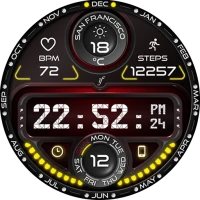
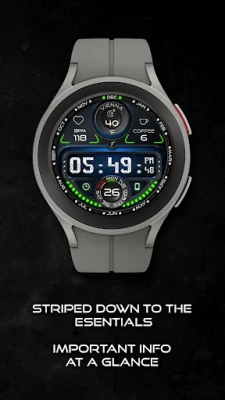
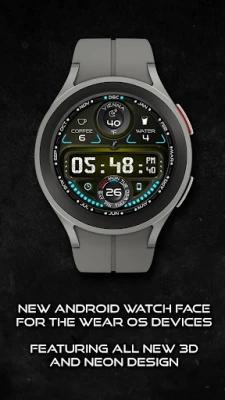
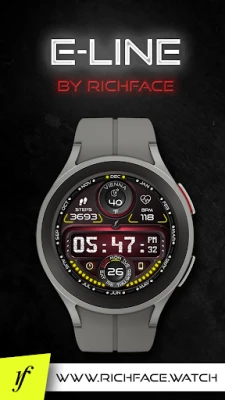
E-line watch face with neon lights is a fun and stylish watch face for your WearOS device. Featuring bright neon lights and a sleek design, this watch face adds a touch of futuristic flair to your wrist. The watch face features a digital display with the current time, date, and battery percentage. It also has a customizable background color, so you can choose the perfect match for your personal style. So why wait? Try E-line watch face with neon lights today and add some neon sparkle to your daily routine!
This watch face supports only WearOS by Google.
NOT SUPPORTED: Samsung S2/S3/Watch on Tizen OS, Huawei Watch GT/GT2, Xiaomi Amazfit GTS, Xiaomi Pace, Xiaomi Bip, and other watches.
★ Built-in Complications ★
• ★ NEW! Crypto complication ★
• Steps (Built-in steps)
• Weather
• Heart Rate
• Coffee and Water counter
• External complication (The user selects which data sources they want in the complication)
★ Options ★
• ★ Crypto complication ★
• Vibrate every hour
• Beep sound on every hour
• Auto HeartRate monitor
• Forecast (5 days)
• Change color
• 24-hour format
• Leading zero
• Screen time
• Forecast
• Full ambient mode option
• Change color preset on tap
• Tap indicator
• Weather settings (location, providers, frequency update, units)
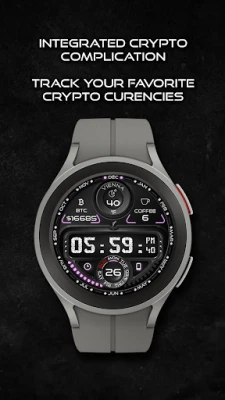
★ NEW Crypto Complication ★
The complication gives you a option to select 2 crypto coins and watch them on top position. In the settings, user is able to select frequent update.
★ Wear OS 3.0 support!
• Fully standalone! (iPhone and Android compatible)
• External complication data for the indicators
★ Device sensor complications:
• Heart Rate monitor complication
• Built-in Steps counter complication
★ FAQ
★ How to select a complication in the desired position ★
- Long tap on the watch face
- System shows the icon "gear" for the watch face settings. Tap on it.
- Select the "Customize" option
- Select "Complications" option
- Select the desired position
- Select built-in complication or
- Select External Complication
• Select any third-party complication
You are ready to go.
Q: Do your watch faces support Samsung Active 4 and Samsung Active 4 Classic?
A: Yes, our watch faces support WearOS smartwatches.
Q: How to install the watch face?
A: Follow these steps:
1. Open the Google Play Store app on your watch
2. Search for the watch face
3. Press the install button
Q: I bought the app on my phone, do I have to buy it again for my watch?
A: You should not have to buy it again. Sometimes the Play Store takes a bit longer to figure out that you already bought the app. Any additional order will automatically be refunded by Google, you will receive the money back.
★★★ DISCLAIMER: ★★★
The watch face is standalone app but the complication for phone battery requires a connection with the companion app on Android phone devices. iPhone users can not have this data due to iOS limitation.
★ Other FAQ find here:
https://richface.watch/faq
!! Please contact us if you have any trouble with the app !!
richface.watch@gmail.com
★ PERMISSIONS Explained
https://www.richface.watch/privacy
NOT SUPPORTED: Samsung S2/S3/Watch on Tizen OS, Huawei Watch GT/GT2, Xiaomi Amazfit GTS, Xiaomi Pace, Xiaomi Bip, and other watches.
★ Built-in Complications ★
• ★ NEW! Crypto complication ★
• Steps (Built-in steps)
• Weather
• Heart Rate
• Coffee and Water counter
• External complication (The user selects which data sources they want in the complication)
★ Options ★
• ★ Crypto complication ★
• Vibrate every hour
• Beep sound on every hour
• Auto HeartRate monitor
• Forecast (5 days)
• Change color
• 24-hour format
• Leading zero
• Screen time
• Forecast
• Full ambient mode option
• Change color preset on tap
• Tap indicator
• Weather settings (location, providers, frequency update, units)
★ NEW Crypto Complication ★
The complication gives you a option to select 2 crypto coins and watch them on top position. In the settings, user is able to select frequent update.
★ Wear OS 3.0 support!
• Fully standalone! (iPhone and Android compatible)
• External complication data for the indicators
★ Device sensor complications:
• Heart Rate monitor complication
• Built-in Steps counter complication
★ FAQ
★ How to select a complication in the desired position ★
- Long tap on the watch face
- System shows the icon "gear" for the watch face settings. Tap on it.
- Select the "Customize" option
- Select "Complications" option
- Select the desired position
- Select built-in complication or
- Select External Complication
• Select any third-party complication
You are ready to go.
Q: Do your watch faces support Samsung Active 4 and Samsung Active 4 Classic?
A: Yes, our watch faces support WearOS smartwatches.
Q: How to install the watch face?
A: Follow these steps:
1. Open the Google Play Store app on your watch
2. Search for the watch face
3. Press the install button
Q: I bought the app on my phone, do I have to buy it again for my watch?
A: You should not have to buy it again. Sometimes the Play Store takes a bit longer to figure out that you already bought the app. Any additional order will automatically be refunded by Google, you will receive the money back.
★★★ DISCLAIMER: ★★★
The watch face is standalone app but the complication for phone battery requires a connection with the companion app on Android phone devices. iPhone users can not have this data due to iOS limitation.
★ Other FAQ find here:
https://richface.watch/faq
!! Please contact us if you have any trouble with the app !!
richface.watch@gmail.com
★ PERMISSIONS Explained
https://www.richface.watch/privacy
Uygulamayı Puanlayın
Yorum ve Değerlendirme Ekle
Kullanıcı Değerlendirmeleri
0 değerlendirmeye göre
Henüz değerlendirme eklenmedi.
SPAM, kötüye kullanım içeren, konu dışı, küfür barındıran, kişisel saldırı içeren veya herhangi bir türde nefret söylemi barındıran yorumlar yayınlanmak üzere onaylanmaz.













Daha Fazla »

Popüler Uygulamalar

Santander Connect UKSantander UK plc

Santander AmexBanco Santander (Brasil) S.A.

اسکل خان : فیلم و سریالHans Schmidt Koblenz

FreeReels: Dramalar ve DizilerSKYWORK AI PTE.LTD.

TUDU: YKS’ye HazırlanTUDU TEKNOLOJI AS

Çorak diyarın hikayesi: UyanışLunarite Studio

Car Parking Multiplayerolzhass

WhatsApp BusinessWhatsApp LLC

WhatsApp MessengerWhatsApp LLC

ING Trader IQING YATIRIM