

En Son Sürüm
Sürüm
8.1.5
8.1.5
Güncelle
Ekim 21, 2025
Ekim 21, 2025
Geliştirici
Monect (Suzhou) Co., Ltd.
Monect (Suzhou) Co., Ltd.
Kategoriler
Araçlar
Araçlar
Platformlar
Android
Android
İndirme
0
0
Lisans
Ücretsiz
Ücretsiz
Paket Adı
com.monect.portable
com.monect.portable
Bildir
Sorun Bildir
Sorun Bildir
PC Remote Hakkında Daha Fazla
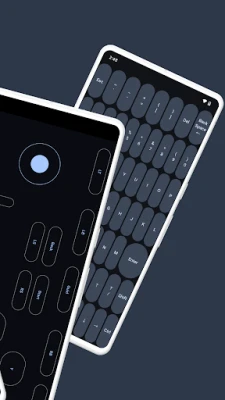
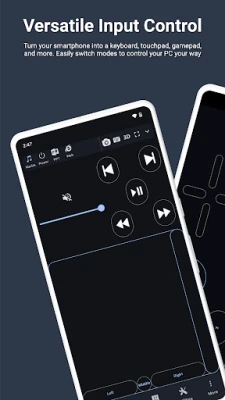
Elevate your PC experience with Monect PC Remote, a versatile and free app designed to give you full control of your computer, whether you're nearby or miles away.
Key Features:
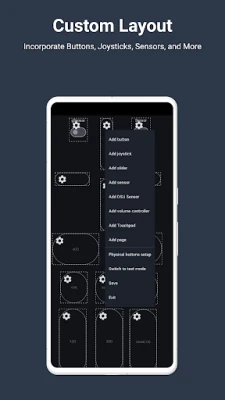
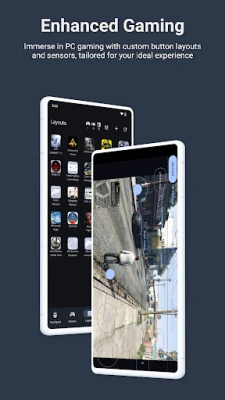
- Enhanced Gaming: Immerse yourself in PC gaming with custom button layouts and onboard sensors. Tailor them to your preferences for an unbeatable gaming experience.
- Real-time Screen and Camera Sharing: Share your PC screen and camera feed seamlessly with your smartphone. Experience your PC as if it's right in your hand.
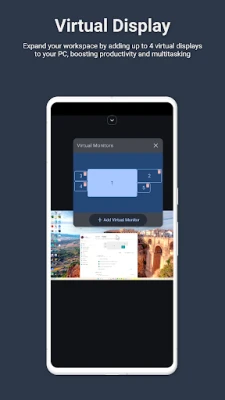
- Multi-Display Capabilities: Expand your workspace by adding up to 4 virtual displays to your PC, boosting productivity and multitasking.
- Digital Artistry: Turn your device into a graphics drawing tablet with support for pressure-sensitive stylus pens. Unleash your creativity in software like Adobe Photoshop®.
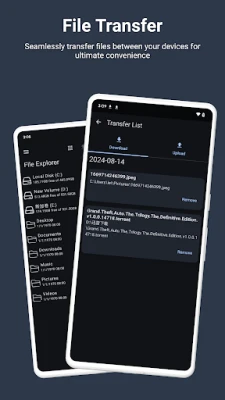
- Effortless File Transfer: Seamlessly transfer files between your devices for ultimate convenience.
- Top-Notch Security: Rest easy with our 256 Bit AES Session Encoding for secure remote network connections.
How to Use:
1. Installation: Download Monect PC Remote from Google Play and the PC Remote Receiver from https://www.monect.com/ on your computer.
2. Connect Your Device: Choose from multiple connection options:
- Local Wi-Fi (on the same network)
- Remote Wi-Fi (across different networks)
- USB tethering from your device
- Share your device's Wi-Fi hotspot
- Bluetooth
[Note: Adobe Photoshop® is a registered trademark of Adobe in the United States and other countries.]
Experience the freedom and control that Monect PC Remote offers, making your PC a truly versatile and powerful tool for work, play, and creativity.
- Enhanced Gaming: Immerse yourself in PC gaming with custom button layouts and onboard sensors. Tailor them to your preferences for an unbeatable gaming experience.
- Real-time Screen and Camera Sharing: Share your PC screen and camera feed seamlessly with your smartphone. Experience your PC as if it's right in your hand.
- Multi-Display Capabilities: Expand your workspace by adding up to 4 virtual displays to your PC, boosting productivity and multitasking.
- Digital Artistry: Turn your device into a graphics drawing tablet with support for pressure-sensitive stylus pens. Unleash your creativity in software like Adobe Photoshop®.
- Effortless File Transfer: Seamlessly transfer files between your devices for ultimate convenience.
- Top-Notch Security: Rest easy with our 256 Bit AES Session Encoding for secure remote network connections.
How to Use:
1. Installation: Download Monect PC Remote from Google Play and the PC Remote Receiver from https://www.monect.com/ on your computer.
2. Connect Your Device: Choose from multiple connection options:
- Local Wi-Fi (on the same network)
- Remote Wi-Fi (across different networks)
- USB tethering from your device
- Share your device's Wi-Fi hotspot
- Bluetooth
[Note: Adobe Photoshop® is a registered trademark of Adobe in the United States and other countries.]
Experience the freedom and control that Monect PC Remote offers, making your PC a truly versatile and powerful tool for work, play, and creativity.
Uygulamayı Puanlayın
Yorum ve Değerlendirme Ekle
Kullanıcı Değerlendirmeleri
0 değerlendirmeye göre
Henüz değerlendirme eklenmedi.
SPAM, kötüye kullanım içeren, konu dışı, küfür barındıran, kişisel saldırı içeren veya herhangi bir türde nefret söylemi barındıran yorumlar yayınlanmak üzere onaylanmaz.










Daha Fazla »

Popüler Uygulamalar

Santander Connect UKSantander UK plc

Santander AmexBanco Santander (Brasil) S.A.

اسکل خان : فیلم و سریالHans Schmidt Koblenz

FreeReels: Dramalar ve DizilerSKYWORK AI PTE.LTD.

TUDU: YKS’ye HazırlanTUDU TEKNOLOJI AS

Çorak diyarın hikayesi: UyanışLunarite Studio

Car Parking Multiplayerolzhass

WhatsApp BusinessWhatsApp LLC

WhatsApp MessengerWhatsApp LLC

ING Trader IQING YATIRIM