

En Son Sürüm
Sürüm
2.10.17
2.10.17
Güncelle
Eylül 30, 2025
Eylül 30, 2025
Geliştirici
Alexander Kozyukov
Alexander Kozyukov
Kategoriler
Araçlar
Araçlar
Platformlar
Android
Android
İndirme
0
0
Lisans
₺194,99
₺194,99
Paket Adı
com.signalmonitoring.wifimonitoringpro
com.signalmonitoring.wifimonitoringpro
Bildir
Sorun Bildir
Sorun Bildir
WiFi Monitor Pro: net analyzer Hakkında Daha Fazla
WiFi Monitor Pro is a powerful tool that allows you to analyze the state of WiFi networks and track its parameters (signal strength, frequency, connection speed, etc). It is useful for setting up a wireless router and Wi-Fi usage monitoring. It can also be used as a scanner helping to discover devices connected to WLAN.
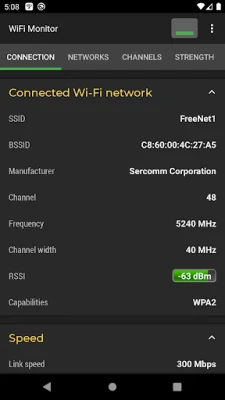
"Connection" tab helps to track information about the connected WiFi hotspot:
• name (SSID) and identifier (BSSID)
• router manufacturer
• connection speed
• router signal strength
• frequency and channel number
• latency info (ping)
• hotspot security options
• MAC address and IP address of smartphone
• subnet mask, default gateway and DNS address.
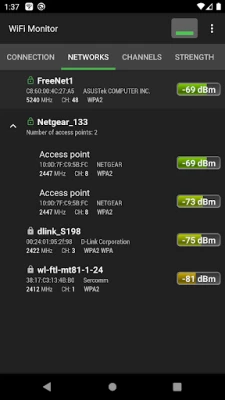
"Networks" tab allows to analyze all available WiFi networks by the following parameters: type, equipment manufacturer, signal level, security protocol. Access points with the same name (SSID) are grouped together.
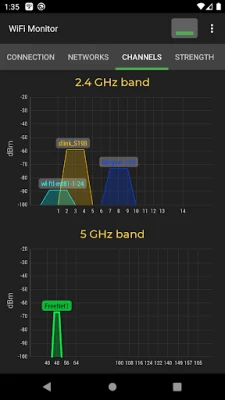
"Channels" tab displays hotspots signal level depending on its frequencies. Routers using same frequencies provide bad quality of a Wi-Fi connection.
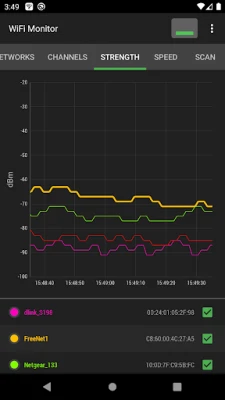
"Strength" chart helps to compare received power levels of available WiFi hotspots and track its dynamics. The higher router signal strength, the better quality of wireless connection.
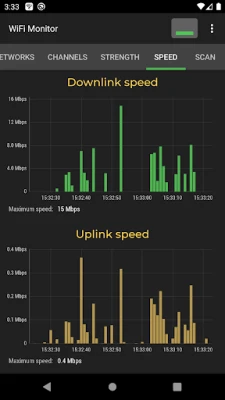
"Speed" chart displays the real amount of transmitted and received data in the connected network. This will help to analyze usage of a hotspot.
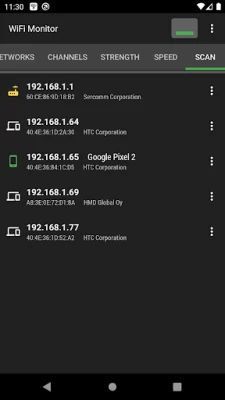
"Scanning" section performs search of devices in the connected network and displays its parameters. If scanner reports about foreign devices in your WLAN, block them in router settings.
Collected data can be saved to log file and exported to other applications.
https://signalmonitoring.com/en/wifi-monitoring-description
• name (SSID) and identifier (BSSID)
• router manufacturer
• connection speed
• router signal strength
• frequency and channel number
• latency info (ping)
• hotspot security options
• MAC address and IP address of smartphone
• subnet mask, default gateway and DNS address.
"Networks" tab allows to analyze all available WiFi networks by the following parameters: type, equipment manufacturer, signal level, security protocol. Access points with the same name (SSID) are grouped together.
"Channels" tab displays hotspots signal level depending on its frequencies. Routers using same frequencies provide bad quality of a Wi-Fi connection.
"Strength" chart helps to compare received power levels of available WiFi hotspots and track its dynamics. The higher router signal strength, the better quality of wireless connection.
"Speed" chart displays the real amount of transmitted and received data in the connected network. This will help to analyze usage of a hotspot.
"Scanning" section performs search of devices in the connected network and displays its parameters. If scanner reports about foreign devices in your WLAN, block them in router settings.
Collected data can be saved to log file and exported to other applications.
https://signalmonitoring.com/en/wifi-monitoring-description
Uygulamayı Puanlayın
Yorum ve Değerlendirme Ekle
Kullanıcı Değerlendirmeleri
0 değerlendirmeye göre
Henüz değerlendirme eklenmedi.
SPAM, kötüye kullanım içeren, konu dışı, küfür barındıran, kişisel saldırı içeren veya herhangi bir türde nefret söylemi barındıran yorumlar yayınlanmak üzere onaylanmaz.














Daha Fazla »

Popüler Uygulamalar

Santander Connect UKSantander UK plc

Santander AmexBanco Santander (Brasil) S.A.

اسکل خان : فیلم و سریالHans Schmidt Koblenz

FreeReels: Dramalar ve DizilerSKYWORK AI PTE.LTD.

TUDU: YKS’ye HazırlanTUDU TEKNOLOJI AS

Çorak diyarın hikayesi: UyanışLunarite Studio

Car Parking Multiplayerolzhass

WhatsApp BusinessWhatsApp LLC

WhatsApp MessengerWhatsApp LLC

ING Trader IQING YATIRIM